

Generate a CSR for new certificate issuing
A CSR or Certificate Signing Request is a block of encrypted text that is generated on the server which will host the certificate. It contains information that will be included in your website’s certificate such as your organisation name, common name (domain name), locality, and country. Your Certificate Provider will need this file in order to generate the SSL certificate for your organisation.
Using the Pressidium Dasbboard
Select SSL Certificates from the top navigation bar.
Click Generate CSR.
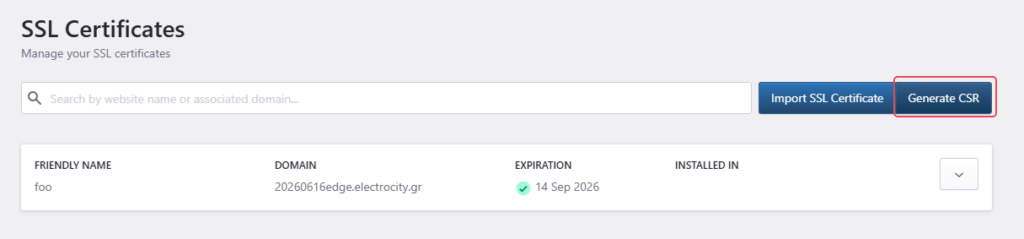
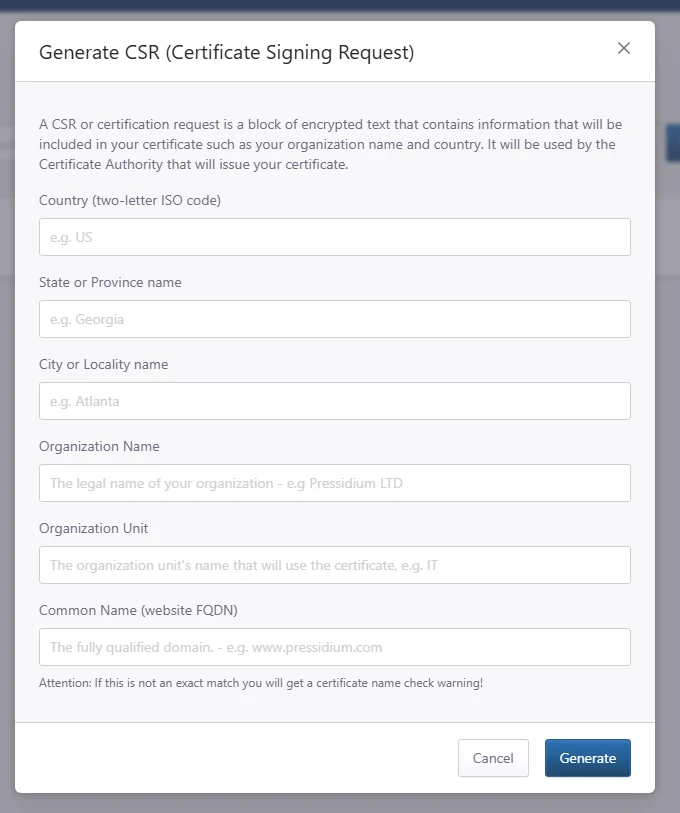
Carefully fill in the form and submit it, this information will be included in your website’s certificate.
Once you submit the form you’ll see the options to download your CSR and your Private Key.
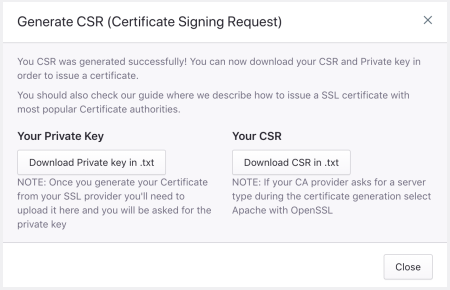
Download them somewhere safe because you’ll need them later.
Supply the CSR to your Certificate Provider in order to issue your new SSL certificate.
Once you have the certificate and the rest of the files from your Certificate Provider, login to your Pressidium Dashboard and follow the instructions on how to import the SSL certificate.
Need help?
If you are not sure what certificate details to enter, or your certificate authority rejects the CSR, contact our Support team before generating a new request.
Where to go next
- Upload a certificate after your certificate authority issues the SSL certificate.
- Review what a PEM file is if your certificate files need to be converted or checked before upload.
- Review what an intermediary CA bundle is if your certificate authority provides intermediate certificates.
- Enable SSL after the certificate is uploaded and ready.
Was this article helpful?