

Upload a custom SSL certificate
Use this guide to import a custom SSL certificate into the Pressidium Dashboard and install it on a website. Before you begin, make sure the private key, certificate, and Certificate Authority bundle are available in PEM format.
Using the Pressidium Dashboard
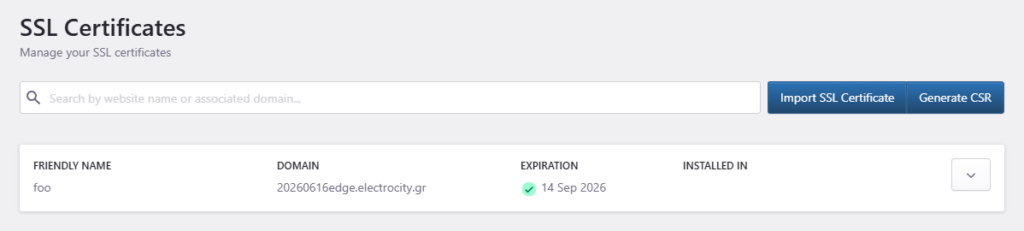
- Go to All websites
- Select SSL Certificates from the top navigation bar.
- Click on Import SSL Certificate.
You will need to provide the following information:
- Name, a unique identifier for the certificate.
- Private key, the private SSL key.
- Certificate, the certificate generated by your Certificate Provider.
- Certificate Authority (CA) Bundle, the intermediate certificate bundle provided by your Certificate Provider.
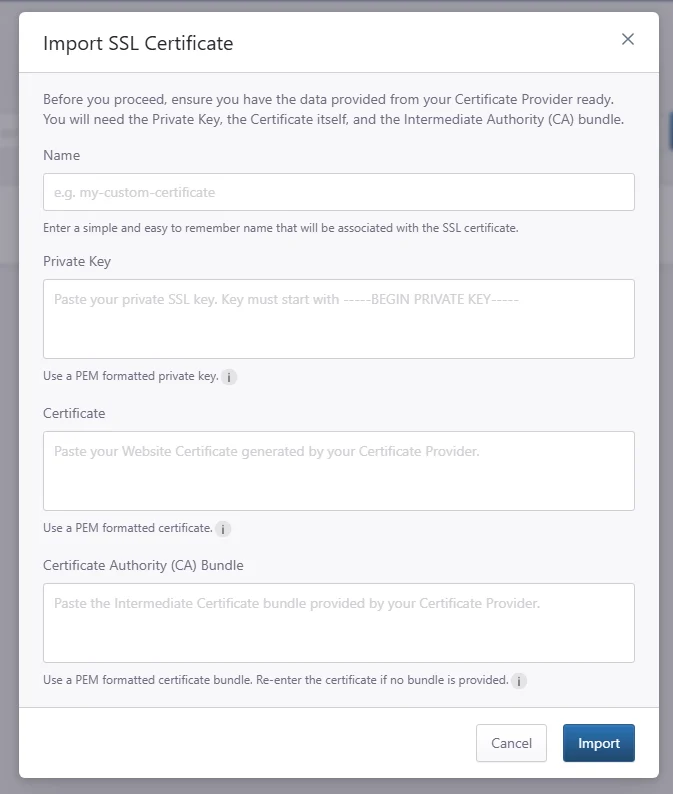
Before copy/pasting any data into the fields, make sure that the Private Key, the Certificate and the Certificate Authority (CA) bundle are in PEM format .
Click Import to import and save the certificate.
To use / install the newly imported certificate to a website:
- Go to your website’s overview (use the S keyboard shortcut to quick-find your website).
- Navigate to the Domains page by clicking the link on the navigation bar.
- Locate the domain associated with the certificate and click Configure ->Change Behavior.
- Select Yes for Enable HTTPS (if not already selected).
- Select Custom from 3rd party provider for Select type of SSL Certificate.
- Using the drop-down selection box select the certificate you recently imported.
- Click Confirm to save the changes. A background job will be initiated to install and configure the certificate on the website.
Please note that the certificate Common Name (CN) must match the domain name. In the case of a single-name certificate, the common name should be valid for and include both www and the non-www hostname (e.g. example.com, www.example.com).
Need help?
If the certificate upload fails, or you are not sure whether your certificate files are in the correct format, contact our Support team before uploading again.
Where to go next
- Review what a PEM file is if you need to check or convert your certificate files before upload.
- Review what an intermediary CA bundle is if your certificate authority provides intermediate certificates.
- Enable SSL after the certificate is uploaded and active.
- Generate a CSR for new certificate issuing if you need to request a new certificate from your certificate authority.
Was this article helpful?