

Review and sign the Data Processing Agreement
The European Union General Data Protection Regulation (“GDPR”) is effective as of May 25, 2018. This regulation broadens the privacy rights that EU individuals have over how their personal data is collected, processed and maintained. It also enforces EU data protection laws to guide foreign organizations that process personal data pertaining to residents of the European Union.
Pressidium is committed to support its customers in meeting their obligations under the GDPR, through its role as a vendor and as a GDPR compliant data processor.
Data Processing Agreement
One of your requirements may be to have a Data Processing Agreement for each of your data processors. For that reason, we provide our customers with a Data Processing Agreement which they can review & accept through our Customer Portal / Dashboard, under their account settings.
Review and sign the agreement
In order to execute the Data Processing agreement, you will need to follow these simple steps:
- Log in to the Pressidium Dashboard.
- Select your profile avatar from the sidebar.
- Select Personal Settings.
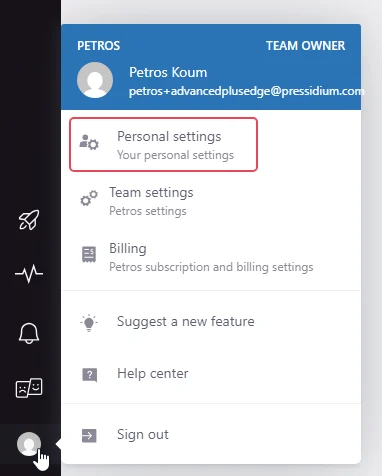
4. Find the Security & Privacy section.

5. Select Data Processing Agreement.
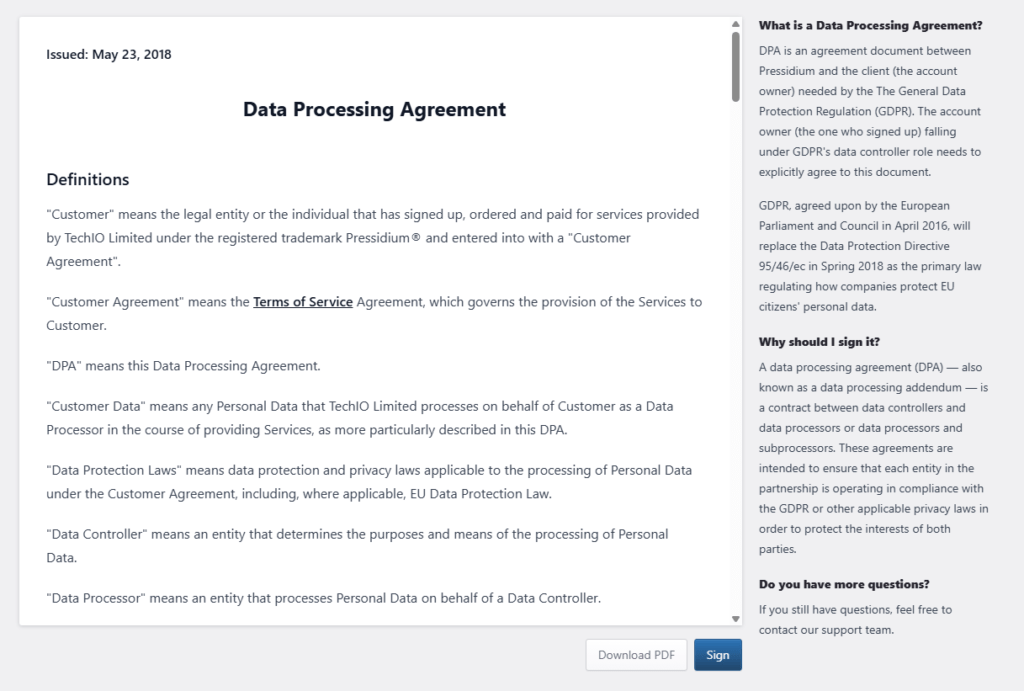
6. Review the agreement.
7. When you are ready to accept it, select Sign.

The Dashboard records your acceptance electronically, and the agreement takes effect.
These steps preserve the procedure currently documented by Pressidium.
Download the signed agreement
After signing:
- Scroll to the bottom of the agreement.
- Select Download PDF.
- Save the file with your organization’s compliance records.
Need help?
If you cannot open, sign, or download the agreement, contact Support and provide:
- the email address associated with your account
- the step where the issue occurs
- a screenshot of the page
- the approximate date and time of the attempt
Where to go next
- Read about GDPR compliance at Pressidium to understand Pressidium’s role as a data processor.
- Secure your account using two-factor authentication to strengthen access to Personal Settings.
- Manage role-based Dashboard users to control who can access account-level settings.
Was this article helpful?