

Deploy Staging to Production
You can deploy tested changes from your staging environment to the production website through the Pressidium Dashboard.
- Select the Websites menu option from the Dashboard sidebar.
- Click on your website’s name to go to the website overview.
- Click the Staging tab.

- Click Staging Operations → Push staging to production.
- Choose what you want to sync by selecting the respective option(s). You can select to deploy only the database (Push database), only files (Push files) or both of them, which is the default selection (both options checked). At least one option must be selected.
- Confirm the operation by clicking on Yes, Push to Production. The action will trigger a background job to overwrite the Production contents with the Staging site contents.
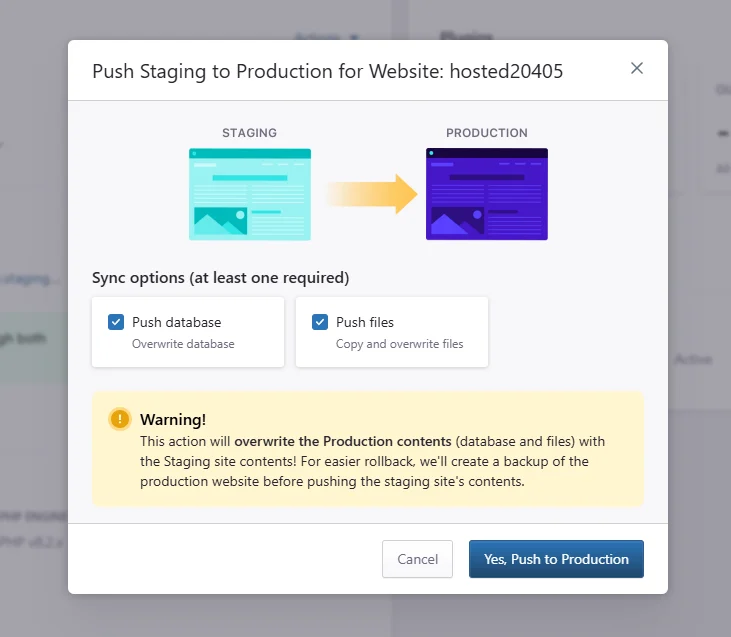
For easier rollback, we’ll automatically create a backup of the production website before pushing the staging site’s contents.
Need help?
If you are not sure whether your staging site is ready to overwrite production, contact our Support team before starting the deployment.
Where to go next
- Create an instant backup before deploying staging changes to production.
- Initialize your staging environment if staging has not been created yet.
- Review access and error logs after deployment if the production site shows errors.
- Clear your WordPress site cache if production does not show the latest deployed changes.
Was this article helpful?