

Image smacking
Image smacking is an internal Pressidium service that optimizes your media in a lossless way. It is enabled by default and automatically performs a number of optimizations on each individual image.
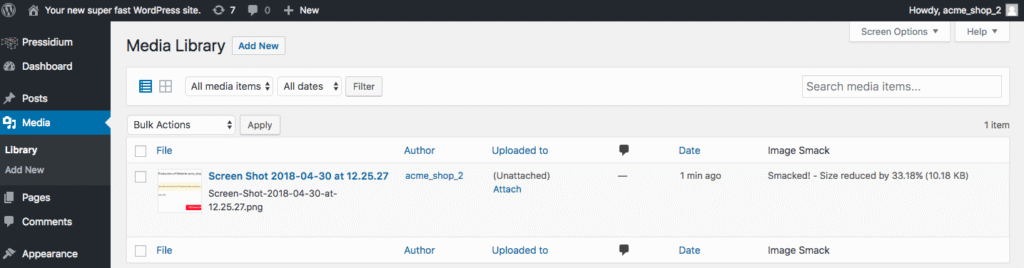
You can find each media’s achieved optimization rate by visiting the Media Library in your WordPress administration menu, and selecting the List icon on the left. You can also manually smack an individual image.
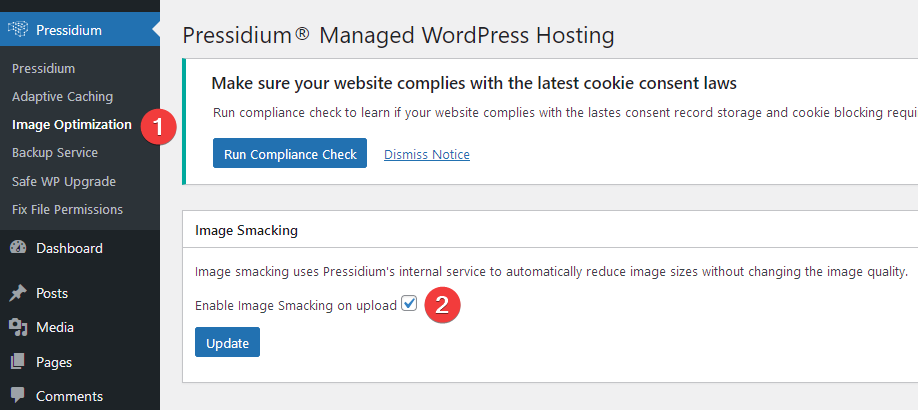
We strongly suggest you keep the image smacking service enabled. You can disable image optimization for an individual website by deselecting the related option in Image Optimization tab:
- Open Image Optimization
- Uncheck Enable Image Smacking on upload
If you want to perform a mass / bulk smacking operation, please open a support request so we can investigate your case.
Need help?
If you need to run image smacking in bulk, or you are not sure whether image optimization should stay enabled for your site, contact our Support team for guidance.
Where to go next
- Review website analytics if you want to monitor site performance after image optimization.
- Clear your WordPress site cache if optimized images do not appear immediately.
- Enable the CDN service if you also want static assets to be delivered through the CDN.
- Create an instant backup before making wider media or site changes.
Was this article helpful?