

Understanding requests
Pressidium EDGE plans are based on the number of requests your websites send through EDGE each month.
This guide explains what a request is, how requests relate to your plan, and why request-based pricing is different from per-site pricing.
What is a request?
A request is any time a browser, bot, application, or service asks your website for something through Pressidium EDGE.
For example, a request can be made for:
- A web page
- An image
- A CSS file
- A JavaScript file
- A font file
- A WordPress REST API response
- An AJAX request
- A feed request
- A login page request
- A request from a bot, crawler, or scanner
When a visitor loads one page, the browser usually makes more than one request. It may request the HTML page first, then additional files such as images, stylesheets, scripts, fonts, and other assets.
Example
A visitor opens your homepage.
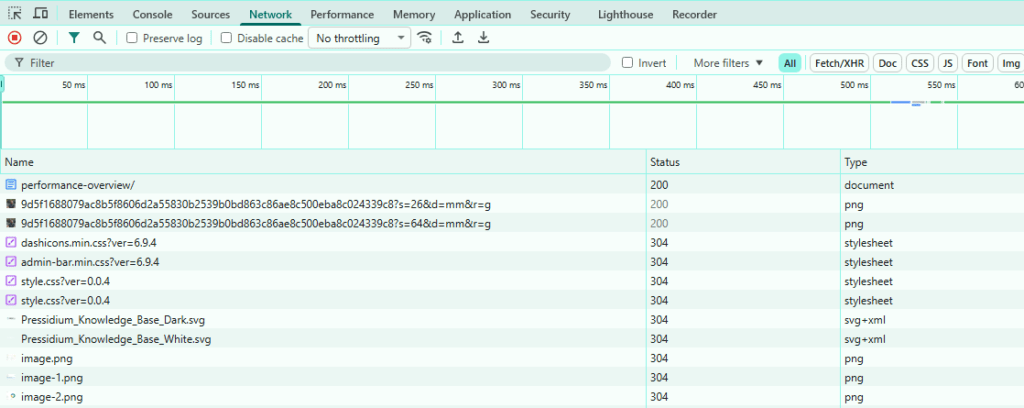
That page may generate requests such as:
- 1 request for the HTML page
- 3 requests for CSS files
- 5 requests for JavaScript files
- 12 requests for images
- 2 requests for fonts
In this example, one page view may create 23 requests.
The exact number depends on how your WordPress site is built, which theme and plugins it uses, and how many assets are loaded on each page.
Why EDGE uses requests for pricing
Pressidium EDGE pricing is based on usage, not on the number of WordPress sites you add.
This means you can add multiple websites to the same plan without paying per site. Your plan is based on the total number of requests served through EDGE across all websites in your account.
For agencies, developers, and teams managing several WordPress sites, this makes pricing easier to scale because site count does not create extra per-domain fees.
What counts toward your monthly request usage?
Your monthly request usage includes traffic that reaches Pressidium EDGE for your connected websites.
This can include:
- Cached page requests served directly from EDGE
- Static asset requests, such as images, CSS, JavaScript, and fonts
- Dynamic WordPress requests that pass through EDGE
- Requests forwarded to your origin
- API, AJAX, feed, and other WordPress-generated requests
- Automated traffic such as bots, crawlers, and scanners
EDGE processes requests before they reach your origin. Some requests may be served from cache, some may be forwarded to your origin, and some may be handled by security rules.
Cached requests vs uncached requests
A cached request is served directly from EDGE without requiring your origin server to generate the response again.
An uncached request is passed from EDGE to your origin because it cannot be served from cache. This may happen when the request is for logged-in content, personalized content, excluded URLs, checkout flows, admin pages, or other content that should not be cached.
Both cached and uncached requests are part of your traffic volume.
The difference is how EDGE handles them.
Cached requests usually reduce origin load and improve response times because the origin does not need to process each request.
Requests are not the same as visitors
Requests and visitors are different metrics.
One visitor can generate many requests during a single page load. If the visitor opens several pages, the number of requests increases.
For example:
- 1 visitor loading 1 lightweight page may generate 15 requests
- 1 visitor loading 1 media-heavy page may generate 80 requests
- 1 visitor browsing 10 pages may generate hundreds of requests
Because of this, monthly requests will usually be much higher than monthly visitors or page views.
Requests are not the same as page views
A page view usually refers to one loaded page.
A request refers to each individual resource requested while loading that page.
For example, one page view can include the page HTML, images, scripts, stylesheets, fonts, tracking files, and other assets. Each of these can be counted as a separate request.
How multiple sites affect request usage
All websites connected to your EDGE plan contribute to the same monthly request total.
For example, if you manage five websites under one plan:
- Site A uses 3 million requests
- Site B uses 4 million requests
- Site C uses 1 million requests
- Site D uses 7 million requests
- Site E uses 5 million requests
Your total monthly usage is 20 million requests.
You are not billed separately per website. You choose a plan based on the total request volume across the sites you manage.
How to choose the right plan
Choose a plan based on your expected monthly request volume.
If you are starting small or testing EDGE, the PAYG plan lets you begin with the included free request allowance and pay for additional usage as needed.
If your traffic is more predictable, a fixed-rate plan can be a better fit because it includes a set amount of monthly requests at a lower effective rate.
If you manage many high-traffic sites or expect hundreds of millions of requests, an Enterprise plan may be more appropriate.
What happens if you exceed your included requests?
Fixed-rate plans include a set number of monthly requests.
If your usage goes above the amount included in your plan, your site will continue to run normally.
EDGE does not stop serving traffic just because you exceed your included request allowance.
Additional usage is billed as overage at the published rate for extra requests.
You can also upgrade to a larger plan if your traffic consistently grows beyond your current allowance. This can help you reduce overage charges and move to a better, more effective rate.
Why your request count may change
Your monthly request usage can change for several reasons:
- More visitors
- More page views
- Larger pages with more assets
- New plugins or theme changes
- More images, scripts, or fonts
- Increased bot or crawler activity
- Marketing campaigns or traffic spikes
- Search engine crawling
- Attack traffic or scanning activity
- Cache configuration changes
If request usage increases suddenly, check whether the change matches a traffic increase, a recent site update, or unusual bot activity.
How caching affects request usage
Caching does not necessarily reduce the number of requests your site receives. Visitors still request pages and assets.
What caching changes is how those requests are handled.
When EDGE serves cached content, fewer requests need to reach your origin. This can reduce server load, improve response times, and help your site stay stable during traffic spikes.
Reducing unnecessary requests
You can reduce unnecessary request volume by keeping your WordPress site efficient.
Useful practices include:
- Remove unused plugins and scripts
- Avoid loading unnecessary assets on every page
- Optimize images
- Use efficient themes and page builders
- Limit unnecessary third-party scripts
- Review bot activity
- Use caching rules carefully
- Avoid duplicate optimization plugins that generate extra files or requests
The goal is not to reduce every request. Some requests are normal and necessary. The goal is to avoid wasteful or duplicated traffic.
Where to go next
- Review Requests Analytics to investigate request volume, traffic spikes, frequently requested paths, redirects, and errors.
- Review Cache Analytics to see which requests are served from cache, missed, or intentionally bypassed.
- Review Geo & IP Analytics to identify the countries and IP addresses generating the most requests and investigate unusual traffic.
Was this article helpful?