

How Pressidium EDGE Works
Pressidium EDGE sits between your visitors and your WordPress site.
After your site is routed through EDGE, incoming requests reach the edge network before they reach WordPress.
EDGE filters malicious traffic, serves cacheable content from nearby edge locations, and forwards only requests that need a fresh WordPress response to the origin.
What Pressidium EDGE does
Pressidium EDGE performs three core functions on incoming requests: delivery, caching, and protection. Custom web rules give you additional control over how traffic is handled before it reaches your site.
- Delivers content from the nearest edge location. A global network of edge servers reduces the physical distance between your visitors and your content, lowering latency worldwide.
- Caches responses so most requests never reach WordPress. Static assets, pages, and API responses that qualify for caching are served directly from the edge without contacting your origin.
- Filters attacks at the network and application layers. Volumetric DDoS traffic is absorbed at the network perimeter. Application-layer threats such as brute-force attempts and injection attacks are blocked by the Firewall before they reach WordPress.
You can also create custom web rules to shape traffic by path, IP, country, header, or other request conditions.
Why this matters for your site
Fewer requests reaching WordPress means:
- Faster page loads. Cached responses are served from the closest edge location, not from your origin.
- Lower server resource usage. Your hosting handles only the requests that genuinely need a fresh WordPress response.
- Continued availability during spikes and attacks. Traffic surges and malicious requests are absorbed at the edge rather than overwhelming your server.
You get these benefits as soon as your site is routed through Pressidium EDGE. No changes to existing code, WordPress core, themes, or plugins are required.
What you can control
Gives you one place to manage performance, security, and traffic controls. Instead of configuring separate CDN, firewall, caching, and analytics tools, you manage EDGE settings, cache behaviour, Firewall controls, custom rules, and traffic insights from the Pressidium EDGE dashboard.
From the Pressidium EDGE dashboard, you can:
- Review traffic volume and cache-hit rates
- Adjust cache rules and exclusions
- Configure Firewall behaviour and IP access rules
- Monitor security events and blocked requests
Request flow: from browser to WordPress
Here is what happens when someone requests a page on your site:
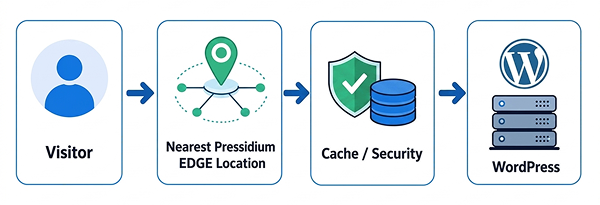
- The visitor’s browser sends a request. The browser resolves your domain and opens a connection. Because your DNS points to Pressidium EDGE, the request is received by the edge network, not by your origin directly.
- The request is routed to the nearest Pressidium EDGE location. Anycast routing directs the connection to the geographically closest edge server, minimising round-trip time.
- Security checks run first. Network-level protection (Layer 3/4) drops volumetric attacks and malformed packets. The Firewall (Layer 7) then inspects the HTTP request against rulesets that cover brute-force attempts, injection attacks, and known vulnerability signatures.
- Pressidium EDGE checks whether the content is cached. If a valid cached copy exists at this edge location, the request is answered immediately without contacting your origin.
- If the content is not cached, Pressidium EDGE fetches it from WordPress. The edge server opens a connection to your origin, retrieves the response, and if the response is cacheable stores a copy for subsequent requests.
- The response is optimised and delivered to the visitor. Compression (Brotli or GZIP) is applied, HTTP/2 or HTTP/3 multiplexing is used for the connection, and the final response reaches the browser.
This entire sequence completes in milliseconds. For cached content, steps 5 and 6 are reduced to serving the stored copy directly.
Performance layers (why EDGE is fast)
Global Pressidium EDGE network (CDN)
Pressidium EDGE operates a distributed network of edge servers. When a visitor requests your site, the request is routed to the closest available location. This reduces the physical distance data must travel and lowers latency for visitors regardless of their geographic location.
Both static assets (images, CSS, JavaScript) and qualifying dynamic responses (HTML pages, REST API calls) can be served from the edge. The further your visitor is from your origin server, the greater the latency improvement.
Caching
Caching is typically the largest factor in reducing response times for your site.
When Pressidium EDGE receives a request, it evaluates whether the content can be served from cache. This decision is based on:
- Content type. Static assets like images, stylesheets, and scripts are cached by default. HTML pages and dynamic responses are cached according to rules that account for WordPress-specific behaviour.
- Cache rules and exclusions. You can define which URLs, query strings, or content types should be cached or excluded. Pressidium EDGE ships with sensible defaults that cover most WordPress configurations.
- Cache freshness (TTL). Each cached object has a time-to-live value. When the TTL expires, Pressidium EDGE revalidates the content with your origin on the next request.
Cached responses are served directly from the edge server. Your origin is not contacted, which reduces server load and improves reliability during high-traffic periods.
Read more:
Protocol and compression optimisation
Pressidium EDGE automatically applies protocol and compression optimisations to every response. These happen transparently at the edge. No WordPress changes are required.
HTTP/2 and HTTP/3. Both protocols support multiplexing, which allows multiple requests and responses to share a single connection. HTTP/3 uses QUIC (a UDP-based transport) for faster connection establishment and improved performance on unreliable networks. Pressidium EDGE negotiates the best available protocol with each visitor’s browser.
Brotli and GZIP Compression. Text-based responses (HTML, CSS, JavaScript, JSON) are compressed before delivery. Brotli offers higher compression ratios than GZIP for most content types. Pressidium EDGE serves Brotli to browsers that support it and falls back to GZIP for older clients.
The combined effect is smaller transfer sizes and fewer round trips, which directly improves page load times.
WordPress-aware optimisation
Pressidium EDGE is built specifically for WordPress. Unlike generic CDN and security services, it understands WordPress traffic patterns and adjusts its behaviour accordingly.
Logged-in vs anonymous visitors.
Pressidium EDGE detects WordPress authentication cookies and bypasses the cache for logged-in users. This ensures that admin bars, personalised content, and edit previews are always served fresh from the origin.
Admin and preview paths.
Requests to /wp-admin/, /wp-login.php, and post preview URLs are never cached. These paths always reach your origin server even when the “Caching for logged-in users” is enabled.
WooCommerce and dynamic pages.
Cart, checkout, and account pages are excluded from caching by default to prevent stale or cross-user data from being served.
Cache Management.
You can freely customize the caching engine and define URLs to prevent the engine from caching them.
When the Pressidium Performance Plugin is installed, Pressidium EDGE gains additional context about your site. The plugin communicates which content has changed, enabling more precise cache purging and allowing Pressidium EDGE to safely cache a wider range of content without breaking site functionality.
See also:
Security layers (why EDGE is safe)
Pressidium EDGE applies security in two distinct layers. Both are active by default and require no manual configuration for standard WordPress sites.
Network-level protection (layer 3/4)
Layer 3/4 protection operates at the network and transport levels below HTTP. It handles threats that target your server’s availability rather than your application logic.
This layer absorbs:
- Volumetric DDoS attacks. Large floods of traffic designed to saturate your server’s bandwidth or exhaust its connection capacity. Pressidium EDGE’s network absorbs this traffic across distributed edge locations so that no single point is overwhelmed.
- Malformed packets. Traffic that does not conform to expected protocol standards is dropped before it reaches your origin.
Your origin server stays online even under heavy attack because the attack traffic never reaches it. It is handled entirely at the Pressidium EDGE network perimeter.
Firewall (layer 7)
The Pressidium EDGE Firewall operates at the application layer inspecting the contents of HTTP requests, not just their headers or source addresses. This allows it to detect and block threats that target your WordPress application directly.
The Firewall protects against common attack patterns, including:
- Brute-force login attempts. Repeated authentication requests targeting
/wp-login.phpor the XML-RPC endpoint are rate-limited and blocked. - SQL Injection. Requests that attempt to manipulate database queries through form fields, URL parameters, or headers are identified and rejected.
- Cross-site scripting (XSS). Payloads that attempt to inject executable scripts into your site’s responses are filtered.
- Known vulnerability signatures. Firewall rulesets are updated continuously to cover newly disclosed vulnerabilities in WordPress core, plugins, and themes.
Firewall rules are applied automatically. You do not need to write or maintain rules manually. If you need to adjust behaviour, for example, to allowlist a specific IP or relax a rule that is producing false positives, you can do so from the Pressidium EDGE dashboard.
Virtual patching and security headers
Virtual patching allows Pressidium EDGE to block exploitation of known vulnerabilities at the edge, even if the affected plugin or WordPress core version has not yet been updated on your origin.
Virtual patching is a mitigation measure, not a permanent fix. You should still update vulnerable plugins, themes, and WordPress core as soon as patches are available.
Learn more about how this works in Virtual patching.
What happens during traffic spikes or attacks
Pressidium EDGE handles sudden traffic increases and malicious activity automatically. In most cases, you do not need to take any action.
- Traffic spikes, whether from a product launch, a social media mention, or seasonal demand, are absorbed at the edge. Cached content continues to be served at scale without additional load on your origin.
- DDoS attacks are mitigated at the network and application layers as described above. Your origin is shielded from the attack traffic.
- Legitimate visitors continue to access your site normally throughout a spike or attack. Pressidium EDGE distinguishes between genuine traffic and malicious requests.
You can monitor traffic patterns and security events from the Pressidium EDGE dashboard. If you notice unusual activity that is not being handled automatically, you can always use Dashboard tools to block the traffic or contact Support with the affected domain, the timestamps of the activity, and any relevant details from the Traffic Overview screen.
What Pressidium EDGE does not do
- Pressidium EDGE does not replace your hosting provider. Your WordPress installation, database, and server environment remain with your current host. Pressidium EDGE sits in front of your host and handles delivery, caching, and security.
- Pressidium EDGE does not modify WordPress core files. No code is changed on your origin. The Pressidium Performance Plugin is the only component installed within WordPress, and it communicates with Pressidium EDGE. It does not alter core behaviour.
- Pressidium EDGE does not break plugins by default. Cache rules are designed to avoid interfering with dynamic WordPress functionality. If a specific plugin requires a cache exclusion, you can configure one from the dashboard or the plugin settings.
See Cache Rules & Exclusions for details.
Where to go next
Now that you understand how Pressidium EDGE processes traffic before it reaches your origin, continue with the next guide that matches your goal.
- To review the core concept before setup, read What is Pressidium EDGE.
- To compare EDGE with separate CDN, WAF, and plugin-based tools, read EDGE vs CDN, WAF, and plugin-based tools.
- To review request limits, plan types, and billing terms, read Pressidium EDGE plans and pricing.
- To start configuring a site, follow Add a WordPress site.
Was this article helpful?