

All sites overview
The Sites overview page gives you a bird’s-eye view of the websites in your EDGE account.
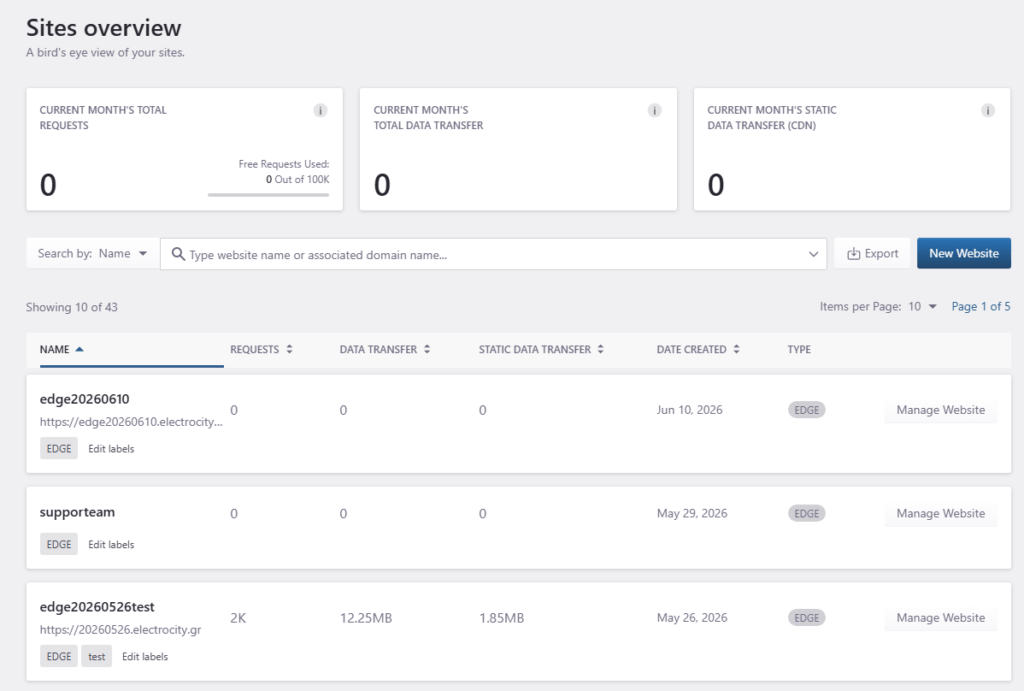
Use this page to review usage, search for websites, export site data, create a new website, and open the management page for an existing website.
Access the All sites overview screen
- Log in to the Pressidium Dashboard.
- Go to Websites.
Sections included
- Usage summary for reviewing account-level requests and data transfer
- Search and actions for finding websites, exporting data, and adding a website
- Website list for reviewing usage and opening individual website management pages
Usage summary
At the top of the page, the Sites overview page shows account-level usage totals for the current billing cycle.

The summary cards include:
- Current month’s total requests: The total number of HTTP requests served by your EDGE service during the current billing cycle. Depending on your plan, requests beyond the included quota may count as overage.
- Current month’s total data transfer: The total amount of data transferred by your EDGE service during the current billing cycle, including both static and dynamic content.
- Current month’s static data transfer (CDN): The amount of static content delivered through CDN delivery during the current billing cycle, such as images, stylesheets, and scripts.
If your plan includes free requests, the requests card also shows how many free requests have been used.
Search bar
Use the search bar to find a website by name or associated domain.

- Use the search selector to choose the search type.
- Enter the website name or associated domain.
- Review the filtered results.
Export website data
Click Export to download the current website list and related usage data.
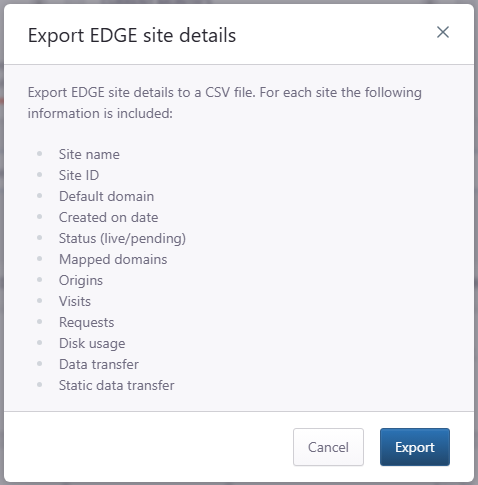
Use this option when you need a local copy for reporting, billing review, or account auditing.
Create a new website
Click New Website to add another WordPress website to your EDGE account.
For the full step-by-step process, see Creating Your First WordPress Site.
Website list
The website list shows the websites in your EDGE account.
Each row includes:
- Name: The website name and associated domain.
- Requests: Requests recorded for the website.
- Data transfer: Total data transferred for the website.
- Static data transfer: Static CDN data transferred for the website.
- Date created: The date the website was created.
- Type: The website type, such as EDGE.
- Manage Website: Opens the website management page.

Labels
Labels help you organize websites by client, environment, priority, project, or workflow.
Click Add labels on a website row to add or update labels for that website.
Manage a website
Click Manage Website to open the website management page where you can review and configure settings and tools for that specific site.
Need help?
If website details or usage values appear incorrect, contact Support and include:
- Account name
- Affected website name and domain
- The usage value or website detail that appears incorrect
- Screenshot of the All sites overview page
- Approximate date and time when you noticed the issue
- Exported website data, when relevant
Where to go next
From the Websites overview page, continue with the task you want to complete.
- To add a new WordPress site to EDGE, follow Add a WordPress site.
- To manage an individual site, open Site overview.
- To review traffic for a site, open Traffic at a glance.
- To review cache and performance data, open Performance overview.
- To review security activity, open Security overview.
- To organize multiple sites, follow Organize websites with labels.
Was this article helpful?